SOCKS5 Proxy DNS: Fix Local vs Remote Resolution
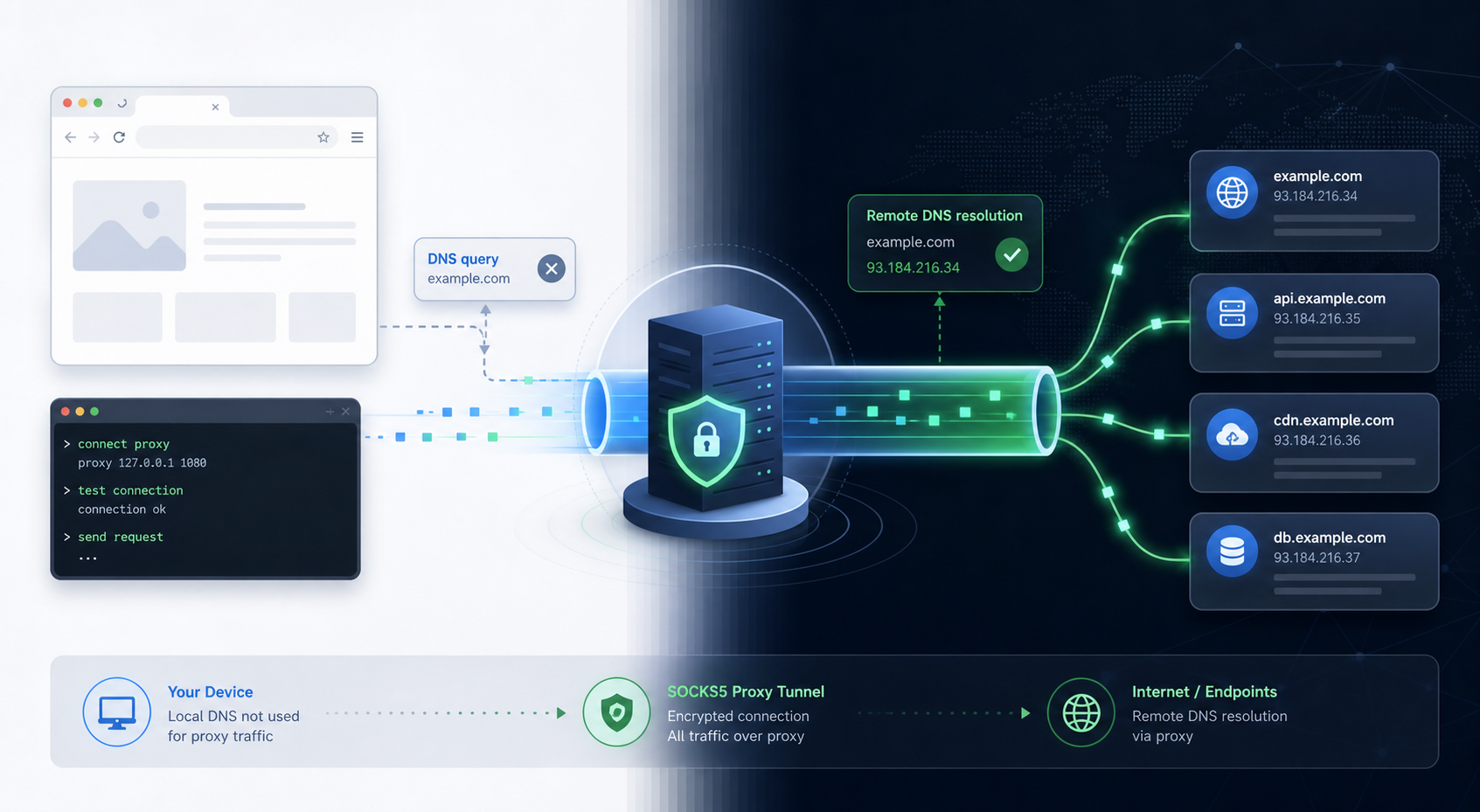
If a SOCKS5 proxy connects but the target site still sees the wrong region, the problem is often DNS resolution, not the proxy IP. Check whether your app resolves the hostname locally before opening the SOCKS tunnel. If it does, switch the client to remote DNS resolution, use a socks5h:// style URL where the library supports it, and then retest both DNS and the exit IP from the same tool.
This matters because a SOCKS5 proxy can carry the TCP connection through the proxy while the domain lookup still happens on the client side. The connection may look proxied, but DNS logs, geolocation decisions, or allow/block rules can still reflect the local network.
The quick diagnosis
Start with one question: does the client hand a hostname to the proxy, or does it resolve the hostname into an IP address first?
| What you observe | Likely cause | First check |
|---|---|---|
| Exit IP is proxied, but DNS tests show your local resolver | Local DNS resolution before the SOCKS tunnel | Client proxy scheme and DNS option |
| A browser works, but a script leaks or fails | Different defaults in the script library | Compare browser proxy settings with code proxy URL |
| Requests time out only for hostnames, not raw IPs | DNS handling or remote connect timeout | Test remote DNS and then timeout separately |
| Geo-targeting is inconsistent across tools | Each tool resolves or caches DNS differently | Retest from one clean client at a time |
Do not replace the proxy pool first. Confirm the DNS path before judging proxy quality.
Why SOCKS5 DNS fails differently from HTTP proxying
With an HTTP proxy, many clients naturally send the hostname in the request path or CONNECT command. With SOCKS5, the client can either send a domain name to the proxy or resolve the domain locally and send only the resulting IP address. Those two paths can produce different location, blocking, and troubleshooting signals.
For Python, the Requests documentation notes SOCKS support through optional dependencies and distinguishes SOCKS proxy configuration in its SOCKS section for advanced usage. For curl, the dedicated SOCKS documentation explains the difference between local and proxy-side hostname resolution in curl’s SOCKS proxy guide, and the curl man page documents --socks5-hostname for resolving hostnames through the SOCKS5 proxy.
That difference is why two tools can use the same host, port, username, and password but produce different results.
Step 1: Identify the exact proxy URL scheme
Look at the scheme your client uses, not just the proxy host and port.
socks5://often means the client may resolve the hostname locally, depending on the library.socks5h://usually means the hostname is passed through the SOCKS proxy for remote resolution.- GUI tools may expose this as a checkbox such as remote DNS, proxy DNS, or DNS through proxy.
For scripts, keep the proxy string visible in configuration so reviewers can see whether hostname resolution is local or remote. Avoid hiding a socks5:// URL deep inside a helper function if the workflow depends on geo-targeted resolution.
Step 2: Test exit IP and DNS from the same client
Run the IP test and the DNS test from the same browser profile, script, or command-line tool. Mixing a browser IP test with a script DNS test creates false conclusions.
A practical sequence is:
- Open a clean session with the SOCKS5 proxy enabled.
- Check the exit IP and expected country or city.
- Run a DNS leak or resolver test from the same client context.
- Change only the DNS setting or proxy scheme.
- Repeat the same two tests.
If the exit IP changes but DNS still points to the local ISP or corporate resolver, the SOCKS tunnel is not covering name resolution. If both IP and DNS move together, then continue to authentication, timeout, target-site blocking, or IP reputation checks.
Step 3: Separate DNS problems from proxy pool problems
A weak proxy pool can still cause blocks, but DNS leakage has a different signature. Treat the issue as DNS-related when:
- failures appear only on domain names, not on direct IP tests;
- one tool works while another tool using the same proxy account fails;
- local resolver names appear in leak tests;
- changing from local to remote DNS changes the result without changing the proxy endpoint.
Treat it as a proxy-quality or target-site issue when remote DNS is confirmed but the exit IP has poor reputation, the target blocks the ASN, or sessions rotate too aggressively for the workflow.
For geo-sensitive workflows, choose proxy resources that match both the target location and session behavior. If you need residential IPs with country and city targeting, review the available residential proxy options for location-sensitive workflows rather than using a generic endpoint and hoping DNS settings will compensate.
Step 4: Match settings to the workflow
Different workflows need different DNS behavior.
- Web scraping and SERP checks usually need remote DNS so the target sees a consistent proxy-side network path.
- Account management workflows should avoid switching DNS behavior mid-session because platform risk systems may notice sudden network changes.
- Internal testing may intentionally use local DNS for private hostnames, but that should be a deliberate exception.
- Automation scripts should document whether hostnames are resolved locally or through the proxy.
For general product navigation, use the site’s proxy service overview by use case and IP type to map the workflow to a residential, datacenter, rotating, or location-specific setup. The homepage link is useful for orientation, while the residential proxy page is the more direct next step for location-sensitive SOCKS5 workflows.
A safe decision order
Use this order before escalating the issue:
- Confirm credentials and endpoint format.
- Confirm whether the client supports SOCKS5 remote DNS.
- Switch to the remote-DNS form or setting when geo consistency matters.
- Retest IP and DNS in the same client.
- Then evaluate timeout, session stickiness, target blocking, and IP reputation.
This keeps a DNS configuration mistake from being misdiagnosed as a bad proxy, and it keeps a real proxy-quality issue from being hidden behind inconsistent client settings.